We’ll start with a minimal Go server, package it with Docker, spin up a local cluster using Minikube, and write the manifests to get it running.
Why Kubernetes for Go Applications?
Kubernetes provides orchestration that makes managing applications at scale easier. Here’s why Kubernetes works well for Go applications:
- Automatic Scaling and Self-Healing: Kubernetes automatically scales your application based on traffic and restarts failed containers, ensuring high availability.
- Zero-Downtime Deployments: Rolling updates allow you to deploy new versions of your application without downtime.
- Service Discovery and Load Balancing: Kubernetes provides built-in mechanisms for service discovery and distributes traffic evenly across your application instances.
- Resource Optimization: Kubernetes allocates resources (CPU, memory) across your cluster, ensuring optimal utilization.
- Unified Management: Kubernetes simplifies the management of microservices by providing a single platform to deploy, scale, and monitor your applications.
Project Overview
Our tech stack will include:
- Go for the web server
- Docker for containerization
- Minikube for local Kubernetes cluster
- kubectl for cluster management
Here’s the project structure:
Project Structure:
./
├── k8s.yaml
├── Dockerfile
├── main.go
└── README.md
Core Kubernetes Concepts
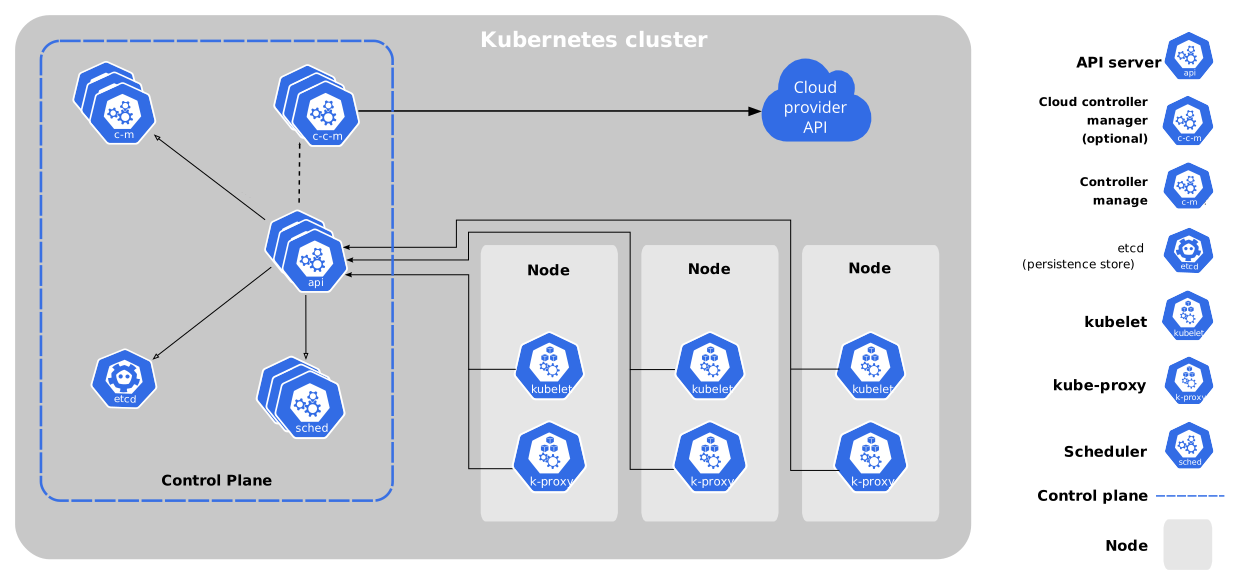
Before diving into the implementation, let’s understand the core Kubernetes concepts we’ll be using:
1. Pods: The Atomic Unit
Pods are the smallest deployable units in Kubernetes. A Pod can contain one or more containers that share the same network and storage namespace. In our case, the Go application will run in a single-container Pod. Pods are ephemeral, meaning they can be created, destroyed, and replaced dynamically.
2. Deployments: State Management
Deployments manage the desired state of your application. They ensure that a specified number of Pod replicas are running at all times. Deployments also handle rolling updates and rollbacks, making them ideal for managing stateless applications like our Go web server.
3. Services: Network Abstraction
Services provide a stable network endpoint to access your Pods. They abstract away the dynamic nature of Pod IPs by providing a consistent DNS name and IP address. In our example, we’ll use a LoadBalancer service to expose our Go application to the outside world.
 https://kubernetes.io/images/docs/components-of-kubernetes.svg
Step-by-Step Implementation
1. Go Application
Let’s start by creating a minimal Go web server. Here’s the code for main.go:
package main

import (
    "context"
    "fmt"
    "log"
    "net/http"
    "os"
    "os/signal"
    "time"
)

func welcomeHandler(w http.ResponseWriter, _ *http.Request) {
    _, err := fmt.Fprintln(w, "Hello, Welcome to Kubernetes world!")
    if err != nil {
        log.Printf("Error writing response: %v", err)
    }
}

func main() {
    mux := http.NewServeMux()
    mux.HandleFunc("/", welcomeHandler)

    server := &http.Server{
        Addr:    ":8080",
        Handler: mux,
    }

    // channel to listen for OS signals
    stop := make(chan os.Signal, 1)
    signal.Notify(stop, os.Interrupt)

    go func() {
        log.Println("k8s-go is running at port 8080 ...")
        if err := server.ListenAndServe(); err != nil && err != http.ErrServerClosed {
            log.Fatalf("server error: %v", err)
        }
    }()

    <-stop
    log.Println("shutting down server...")

    // graceful shutdown
    ctx, cancel := context.WithTimeout(context.Background(), 5*time.Second)
    defer cancel()
    if err := server.Shutdown(ctx); err != nil {
        log.Fatalf("server forced to shutdown: %v", err)
    }

    log.Println("server exited gracefully")
}
This server includes graceful shutdown handling, proper error logging, and structured HTTP routing - essential for production Kubernetes deployments.
2. Containerization with Docker
Next, we’ll containerize the Go application using a multi-stage Dockerfile. This approach ensures that the final image is lightweight by only including the necessary runtime dependencies.
# Build stage
FROM golang:1.23-alpine AS builder
WORKDIR /app
COPY main.go .
RUN GO111MODULE=off go build -o main .

# Runtime stage
FROM alpine:3.21
WORKDIR /app
COPY --from=builder /app/main ./main
EXPOSE 8080
CMD ["./main"]
To build and push the Docker image, run:
docker build -t yinebeb/k8s-go:1.2.1 .
docker push yinebeb/k8s-go:1.2.1
3. Kubernetes Cluster Setup with Minikube
To run Kubernetes locally, we’ll use Minikube. Here’s how to set it up:
# Linux installation
curl -LO https://github.com/kubernetes/minikube/releases/latest/download/minikube-linux-amd64
sudo install minikube-linux-amd64 /usr/local/bin/minikube && rm minikube-linux-amd64

# Start the cluster
minikube start
Verify that the cluster is running:
minikube status
Deployment Configuration
Unified Manifest (k8s.yaml)
We use a single unified configuration file that contains both the Deployment and Service resources, separated by ---. This approach simplifies deployment management and keeps related resources together.
# Deployment Resource
apiVersion: apps/v1
kind: Deployment
metadata:
  name: k8s-go-deployment
spec:
  replicas: 4
  strategy:
    type: RollingUpdate
    rollingUpdate:
      maxUnavailable: 25%  # allow 25% pods unavailable during update
      maxSurge: 25%        # allow temporary scaling up
  selector:
    matchLabels:
      app: k8s-go
  template:
    metadata:
      labels:
        app: k8s-go
    spec:
      containers:
        - name: k8s-go
          image: yinebeb/k8s-go:1.2.1
          imagePullPolicy: IfNotPresent
          ports:
            - containerPort: 8080
          resources:
            requests:
              memory: "64Mi"
              cpu: "100m"
            limits:
              memory: "128Mi"
              cpu: "500m"
          livenessProbe:
            httpGet:
              path: /
              port: 8080
            initialDelaySeconds: 5
            periodSeconds: 10
          readinessProbe:
            httpGet:
              path: /
              port: 8080
            initialDelaySeconds: 5
            periodSeconds: 5

---

apiVersion: v1
kind: Service
metadata:
  name: k8s-go-service
spec:
  type: LoadBalancer
  selector:
    app: k8s-go
  ports:
    - protocol: TCP
      port: 80
      targetPort: 8080
Key Components:
- Replica Count: Set to 4 for high availability and load distribution
- Rolling Update Strategy: Ensures zero-downtime deployments with controlled pod replacement
- Health Probes:
livenessProbe: Restarts containers that become unresponsivereadinessProbe: Ensures traffic only goes to ready pods
- Resource Management: Defines CPU and memory requests/limits for efficient cluster utilization
- LoadBalancer Service: Exposes the application externally via port 80, routing to container port 8080
Deployment Workflow
- Apply the configuration:
kubectl apply -f k8s.yaml
- Verify the deployment:
kubectl get deployments

NAME                READY   UP-TO-DATE   AVAILABLE   AGE
k8s-go-deployment   4/4     4            4           1m
- Check pod status:
kubectl get pods

NAME                                 READY   STATUS    RESTARTS   AGE
k8s-go-deployment-7cb5459755-4mf9t   1/1     Running   0          1m
k8s-go-deployment-7cb5459755-5bljp   1/1     Running   0          1m
k8s-go-deployment-7cb5459755-mbphr   1/1     Running   0          1m
k8s-go-deployment-7cb5459755-t5qp6   1/1     Running   0          1m
- Access the service:
minikube service k8s-go-service --url
# Output: http://192.168.49.2:32657
- Test the endpoint:
curl http://192.168.49.2:32657
# Output: Hello, Welcome to Kubernetes world!
Essential Operations
Scaling
# Scale horizontally
kubectl scale deployment k8s-go-deployment --replicas=5

# Auto-scaling
kubectl autoscale deployment k8s-go-deployment --cpu-percent=50 --min=3 --max=10
Updates and Rollbacks
# Update image version
kubectl set image deployment/k8s-go-deployment k8s-go=yinebeb/k8s-go:1.2.1

# Monitor rollout
kubectl rollout status deployment/k8s-go-deployment

# Rollback to previous version
kubectl rollout undo deployment/k8s-go-deployment
Debugging Techniques
# Inspect pod events
kubectl describe pod k8s-go-deployment-xxxxx

# Follow logs in real-time
kubectl logs -f k8s-go-deployment-xxxxx

# Exec into container
kubectl exec -it k8s-go-deployment-xxxxx -- /bin/sh
Production-Ready Best Practices
- Configuration Management:
- Use ConfigMaps for environment variables.
- Store sensitive data in Kubernetes Secrets.
- Implement namespaces for environment separation.
- Set securityContext in PodSpec for enhanced security.
- Monitoring:
# Install metrics server
kubectl apply -f https://github.com/kubernetes-sigs/metrics-server/releases/latest/download/components.yaml

# View resource usage
kubectl top nodes
Next Steps
Expand your cluster with:
- Ingress controllers for path-based routing.
- Persistent Volumes for stateful applications.
- Helm charts for package management.
- Prometheus and Grafana for monitoring.
Conclusion
In this tutorial, you’ve learned how to:
- Containerize a Go application using Docker.
- Deploy the application on a local Kubernetes cluster using Minikube.
- Implement essential Kubernetes operations like scaling, updates, and debugging.
The full code is available on GitHub.